Possibility to analyze your products through the E-commerce object available in the GTM data-layer (for example in GA4 or Universal Analytics format).
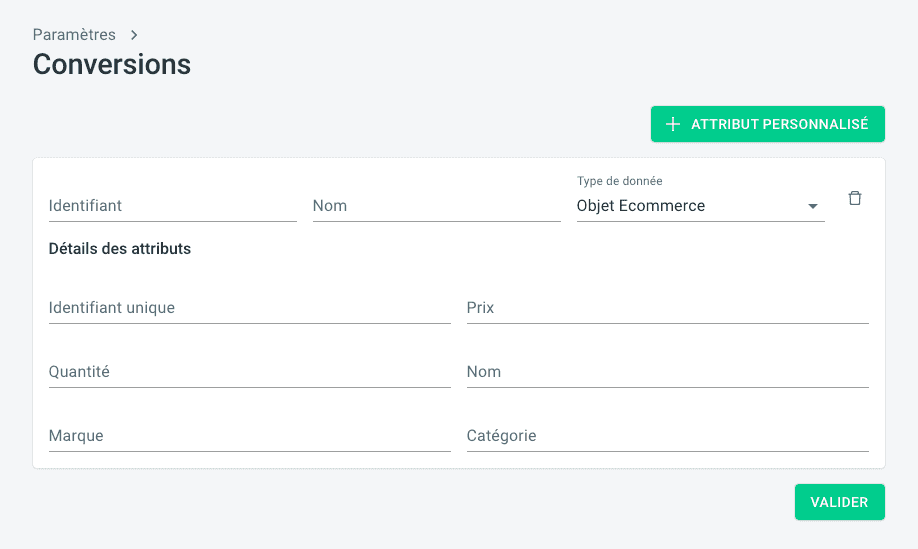
Go to the Marketing Analytics tool settings, then Conversions. Add a custom attribute of type "E-commerce Object" and fill in the following information:
ThankYou Analytics Attributes | Description |
Identifier | Name of the dynamic variable in the conversion event containing the product array. |
Name | Value within the main menu |
Attribute details | |
Unique identifier | Product unique identifier attribute |
Price | Product unit price attribute |
Quantity | Selected quantity attribute |
Name | Product name attribute |
Brand | Product brand attribute |
Category | Product category attribute |
Data format
Documentation available on the Google Analytics website.
"items": [
  {
    "item_id": "123",
    "item_name": "nike pegasus",
    "item_brand": "Nike",
    "item_category": "chaussures",
    "quantity": 2,
    "price": 12
  },
  {
    "item_id": "124",
    "item_name": "semelle confort",
    "item_brand": "Geox",
    "item_category": "semelles",
    "quantity": 1,
    "price": 2
  }
]
Mapping
ThankYou Analytics Attributes | GA4 Attributes |
Identifier | items |
Name | Products |
Attribute details | |
Unique identifier | item_id |
Price | price |
Quantity | quantity |
Name | item_name |
Brand | item_brand |
Category | item_category |
Data format
Documentation available on the Google Analytics website.
"products": [
  {
    "name": "Triblend Android T-Shirt",
    "id": "12345",
    "price": "15.25",
    "brand": "Google",
    "category": "Apparel",,
    "quantity": 1,
  },
  {
    "name": "Donut Friday Scented T-Shirt",
    "id": "67890",
    "price": "33.75",
    "brand": "Google",
    "category": "Apparel",
    "quantity": 1
  }
]
Mapping
ThankYou Analytics Attributes | UA Attributes |
ID | products |
Name | Products |
Attribute details | |
Unique ID | id |
Price | price |
Quantity | quantity |
Name | name |
Brand | brand |
Category | category |